The failure can happen after the file is saved
In a July 27, 2023 original user report, the author used a Samsung Galaxy S23+, Android 13 and a messaging app version 6.27.6. Their steps were to save a public Reel, confirm normal local sound, then send it and play the chat copy. They reported slowed, altered sound only in that copy and said an edited H.264 export worked. This is one user's reported result, not a fix we reproduced or evidence that every similar symptom has the same cause.
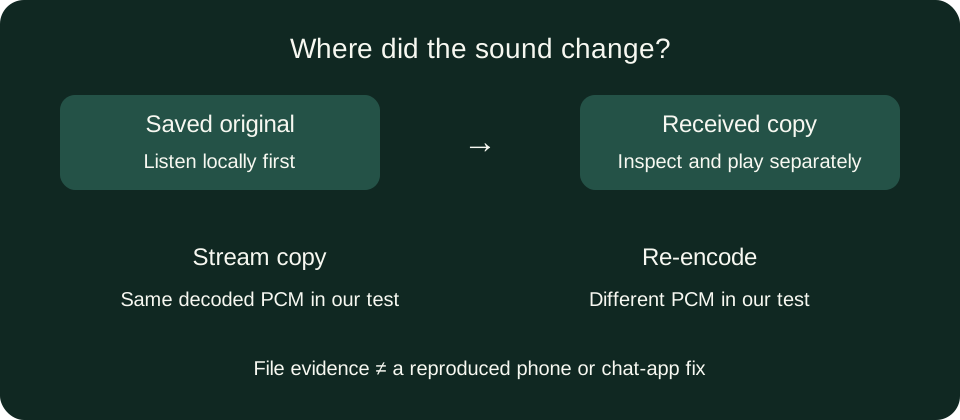
Two local operations on one actual Vidlune download
We requested the approved public Reel DLHx_WNoXoY once through ig-reels-downloader.com/api/download. The response was HTTP 200, video/mp4, 11,097,563 bytes, received in 6.338 seconds. Its streams were VP9 video and HE-AAC audio, 44,100 Hz, stereo. This is one response, not a measurement of all Reels.
Copying streams changed the file, not our decoded audio
FFmpeg stream copying produced an 11,097,570-byte MP4 with a different whole-file SHA-256. Yet both files decoded to exactly 6,344,952 bytes of signed 16-bit PCM audio, with the same PCM SHA-256 shown below. This controlled result shows why a changed file hash is not, by itself, proof that sound was re-encoded or altered.
0cd0e7c0c896d0be2de5eb72ad75370b36adbb9b78d9be475bb1537886cb666aRe-encoding produced different decoded audio
A separate local H.264/AAC encode produced an 11,172,711-byte MP4. Its audio profile was AAC-LC rather than HE-AAC. Decoding it with the same PCM settings returned 6,348,800 bytes and SHA-256 1843b6dfc3152e7f779fc84e6cd9247db26ebaacb8aa530cabe9b7c90757111a, different from the original. That proves these decoded outputs differ; it does not prove audible damage, a better sound, a pitch change or repaired synchronization.
Measured October 7, 2026, 17:17–17:18 (Asia/Shanghai), DESKTOP-OC01O77, Windows 11 Pro 10.0.28000 x64, Node v24.19.0 and FFmpeg 7.1. The download used Node HTTPS, not Chrome; processing and PCM hashing were local. No phone, chat upload, listening test or lip-sync measurement was performed. Different sources, machines and encoder versions can change results.
Reproduce the two comparisons on a permitted saved file
Keep the original. The first command copies streams; the second encodes them again. Use different output names. These commands are local checks, not a Vidlune conversion button or a guaranteed messaging-app repair.
ffmpeg -i original.mp4 -map 0:v:0 -map 0:a:0 -c copy remux.mp4
ffmpeg -i original.mp4 -map 0:v:0 -map 0:a:0 -c:v libx264 -preset fast -crf 23 -c:a aac -b:a 128k converted.mp4
ffmpeg -v error -i original.mp4 -map 0:a:0 -vn -c:a pcm_s16le -f s16le original.pcm
Repeat the PCM command with each output and a different .pcm filename. Compare byte lengths and SHA-256 using the same FFmpeg version and settings. The published PCM hash belongs only to our sample; your file will not normally match it.
Check the received copy, not just the send preview
Keep the downloaded original and, if the destination allows it, save the received copy separately. Play each locally, then inspect their streams with ffmpeg -hide_banner -i filename.mp4. Record which copy first exhibits the symptom, its audio codec, sample rate, duration and the receiving app/version. A player-specific result needs a player test; metadata and hashes cannot establish perceived sound or lip synchronization.
Do not apply a guessed audio delay or repeatedly download the same file before locating the change. Stream copying is not audio repair. A re-encode is a separate experiment and can change samples, so keep the original and verify the new received result. We have not tested which upload option preserves bytes in your chat app, and no “send as file” or H.264 fix is guaranteed here.
Use the instagram reel downloader for a public video. If the original will not play at all, use the MP4 playback check. If you want to preserve an encoded soundtrack instead of converting to MP3, read the audio-fidelity test. FFmpeg documents stream copying and transcoding.