Four outputs, checked beyond the status code
On October 10, we ran a read-only copy of the current Vidlune origin handler locally, replacing its downloader with controlled outputs. The files below are test fixtures, not downloaded Instagram Reels.
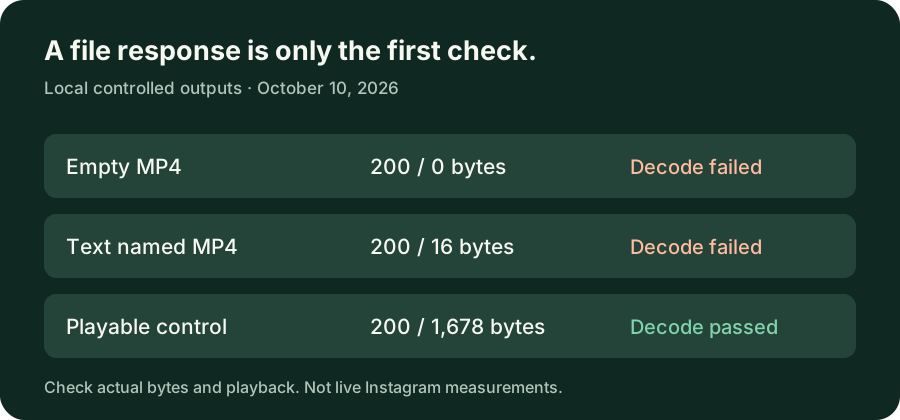
| Injected output | Response | Body / outcome |
|---|---|---|
| Empty MP4 | 200 · Content-Length: 0 | 0 bytes; video decoding failed. |
| Text named MP4 | 200 · Content-Length: 16 | 16 bytes; video decoding failed. |
| Generated playable MP4 | 200 · Content-Length: 1678 | 1,678 bytes; hash matched the input and full video decoding passed. |
| No output file | 400 · UNSUPPORTED_MEDIA | JSON error, with no attachment header. |
The inspected handler filters output filenames by extension and checks an upper byte limit; it does not perform a minimum-size or video-decoding check on this Reel branch. This source observation explains the local results, but does not establish how often an actual Instagram download produces an invalid file.
An empty response still counted in the local allowance test
We then made four empty-output requests with one isolated local test identity. The first three returned 200 with zero-byte bodies; the fourth returned 429 / DAILY_LIMIT_REACHED. This demonstrates the copied handler's response-based accounting, not a measurement of a live customer's allowance.
If an actual saved file is empty, retain its size and the exact message before sending repeated requests. A missing browser download entry and a present but empty file are different observations; this experiment did not test either behavior in a real browser.
What to check on your own file
Use the file's byte count, not just a rounded size label. The File API reference defines File.size as the number of contained bytes. A nonzero count still does not establish playable media: the text control above had bytes but failed decoding.
- Exactly zero bytes: record that result and the public source URL; the file does not contain video data.
- Nonzero bytes but no playback: keep the file for inspection; do not assume it is empty.
- No file: check the browser download entry and the returned error before naming the failure.
HTTP 200 describes request success, not a media-validation guarantee. The HTTP status reference defines that status; our local empty and text controls show why an additional file check matters.
Method, source and limits
The source copy's SHA-256 matched the independently read origin file on October 10. Tests ran on Windows 11 x64 with Node v24.19.0 and FFmpeg 7.1. The playable control was generated locally: a black 160 × 90 H.264 clip, 10 frames per second, 0.3 seconds. The decoder read the full video stream, rather than only inspecting the suffix.
The adapter never contacted Instagram. These tests do not reproduce a live empty-Reel incident, establish its cause, promise file recovery, or measure a phone's saving behavior. The unchanged origin service and its configuration were not modified for this article.
Read the raw response and decoding records or download the local reproduction. Its README states the Node and FFmpeg requirements; exact encoded control bytes can differ with another encoder build.
Keep the next step tied to the symptom
Use the timeout guide when preparation stopped before a file response, or the playback-format guide when a nonempty file has a compatibility problem. For another permitted public-link attempt, return to the instagram reel downloader. Do not interpret a filename or status alone as proof of a complete download.